Tuesday, June 20, 2017
Welcome to Our Blog
Here is our school is documenting evidence and reflections toward proficiency in the goals we've established for the MGI week. Please explore the tabs above to see evidence related to the topics of our work. Use the Proficiency links to the right to explore progress toward the proficiencies we're pursuing. I hope you find some of our work helpful as we all try to figure out personalized learning for young adolescents.

Monday, December 12, 2016
Friday, June 26, 2015
PLP Google site description.
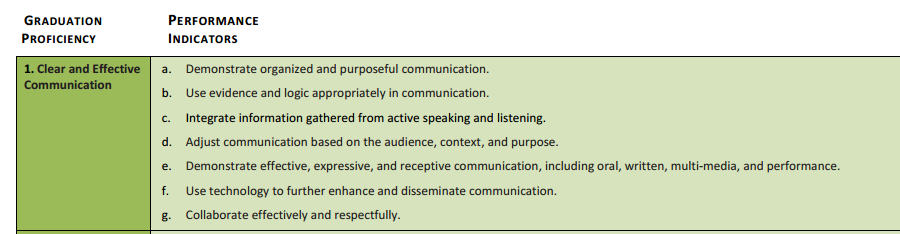
The primary guiding principle behind Personalized Learning Plans (PLPs) is to put students at the center of their learning. The focus of the BAMS PLP is the Vermont Transferrable Skill of Clear and Effective Communication (just one skill to start with), and each student’s personal goal(s). The google site template is set up as a space for students to:
- Create engagement and buy in through a personal home page with a biography, selfie, custom formating, etc (“MY LIFE” Tab) - this connects to the “Identity” part of PLPs
- Set goals as they relate to the transferable skill/s being focused on at a school-wide level.This links to the space for students to collect evidence of their growth (through blogger). (“MY GOALS” Tab)
- Reflect on their goals and learning process at regular intervals, with the summative reflection in the “MY FINAL REFLECTIONS” tab.
- Plan for the future. In the “MY FUTURE” Tab, students will work on long term planning towards high school and career readiness. This specific tab, as well as the overall PLP template, incorporates the district level requirements for WSESU PLPs.
Thursday, June 25, 2015
1:1 Rollout Family Contract from Maura
I went to Maura's workshop on 1:1 rollout in the classroom yesterday afternoon and found it incredibly helpful. Attached to this post you will find my notes with links to Maura's Google Slides presentation and a direct link to the "Family Contract" that her school utilizes that is signed in order for students to take ChromeBooks home. The contract seems like something that we should seriously consider implementing if we want to allow our students to bring home their ChromeBooks. I especially like the idea of students receiving a 90% if they sign the contract and a 100% if they record themselves having a guided discussion with their parents about digital citizenship after. The notes also include some pros and cons of students taking their devices home, information on "zones," and a way to check in to see if you are using ChromeBooks productively in your classroom.
Family contract
Notes from Maura's presentation
Family contract
Notes from Maura's presentation


Wednesday, June 24, 2015
First 8 Weeks - Digital Citizenship
MGI's digital citizenship resources
Notes from the Digital Citizenship break-out group (Mary, Peg, Michael, Debi, Anne)
Notes from the Digital Citizenship break-out group (Mary, Peg, Michael, Debi, Anne)
BAMS google sites tutorial / primer with Mark
BAMS Google Sites Session
Wednesday, 6.24.15 10:00 - 10:45
Goals for this session
Team
|
Individual
|
Final Product(s)
Must have...
Should have...
It would be nice to have…
Work Space and Notes
Themes, Colors, and Fonts
Built in types of pages
Basic
File Cabinet
List
Announcements
Sidebar and Header
Exporting as Templates
Resources and Examples
Next Steps and Timeline
Contact Mark: molofson@uvm.edu
Chromebooks/1:1 Resources
Chromebook Rollout document and BAMS Chromebook Expectations document
I. Staff google training
- basic google apps; Classroom;
- School-wide use of Classroom - consistent school-wide, work flow
- August in-service days
- Google sites - creating websites (especially for making PLP sites)
II. “Optional” Team Parent Night - First Opportunity
Mandatory parent meeting to receive Chromebooks
- Review and agree upon BAMS Student Chromebook Expectations
- Review and agree upon BU6 acceptable use policy
- Team Presentation - show what it is, how it looks, open Google Classroom, PS, website, HW pages
- Basic elements of monitoring teenagers in a digital world (maybe at another admin parent education night)
Two other opportunities for parents to come to school with students for Chromebooks - meet with tech coordinator, admin, volunteers (comp time)
If any missed opportunities, parents need to come and meet with Tech Coordinator during the day to sign off on Chromebooks acceptable use policy before students receive chromebook
III. BAMS BOOT CAMP for students
- BAMS Student Management Expectations
- Chromebook basics & care
- personalizing your chromebook - dos and donts
- Setting up personal accounts/security
- how to get into google account; gmail; documents (these are for school use only)
- Introduce google apps
- how to create a folder
- Safe & ethical use
- what it means to be on school network/digital community
- safe online and manage identity
- basics on how to do searches and what’s appropriate
- “App”etizers
- exploring apps
After the above (parent and Bootcamp lessons) student will receive Chromebooks
Timeline…
BAMS Student Chromebook Expectations
Here are the procedures we will follow until we feel something different needs to be put into place.
- Students WILL pick up their Chromebooks in the morning from their designated charging station if they need them for their first period. (Treat like the first locker stop)
- Students WILL return their Chromebooks at the end of the day to their designated charging station and plug them in.
- Students MAY use the designated charging stations to house their Chromebooks during the day when they are not required for exploratory classes, core classes, or galaxy.
- Students WILL ONLY access the charging stations in between classes as to not interfere with classroom instruction.
- Students MAY leave their Chromebooks in a teacher’s classroom with their other materials during lunch or classes IF they have teacher’s permission.
- Students MAY NOT bring their Chromebooks to the cafeteria.
- Students WILL only have Chromebooks open when instructed to do so by a teacher - including transition time, passing in the halls, galaxy, etc.
- Any Chromebook found unattended in the hallway, gym, MPR, etc. will be picked up returned to technology coordinator and student will lose their Chromebook for the rest of the day.
- Consequences for
- gaming, videos, streaming, etc. during class time - team/teacher consequences
- leaving Chromebooks unattended - team/teacher consequences
- inappropriate offenses - immediate office referral
Teams will determine the number infractions before the first consequence. For example, after three minor infractions, the student is notified of the problem and loses the chromebook for one day and the parents are notified. After the next set of infractions, the student loses the Chromebook for a day and is given an after school detention by the team.
Updated 3-year timeline for PLPs.
Non-Negotiable
|
Year One (Transition)
|
Year Two
|
Year Three
| |||||||
Student Inventories
|
|
|
| |||||||
Personal Goal
|
Broadly defined, students driven for acceptance and buy in.
|
Establish a more obtainable goal, and be able to relate it to one or more transferable skills.
|
Establish a more obtainable goal, and be able to relate it to more than one transferable skill.
| |||||||
Academic Goal
|
1 transferable skill, defined broadly enough that evidence could be obtained in multiple academic setting.
|
Repeat prior years transferable skill, and introduces the other transferable skills and allow choice for second skill.
|
Re-visit all transferable skills, students will be able chose multiple transferable skills.
| |||||||
Biography
|
Third person narrative, Photo, Introduce yourself, life events, hopes and dreams
|
Increased autonomy, including: Photo, Introduce yourself, life events, hopes and dreams
|
Increased autonomy, including: Photo, Introduce yourself, life events, hopes and dreams
| |||||||
Evidence
|
Clear and concise reflection and an example of product for each transferable skill
|
Clear and concise reflection and an example of product for each transferable skill presented.
|
Clear and concise reflection and an example of product for each transferable skill
|
How many subjects?
Community?
School?
Multiple examples?
4 different settings?
| ||||||
Sharing
|
S1: Introduce how to share your PLP by using a teacher example.
Then model with peers, “round table share” with an adult from another team. “All hands on deck”.
S2: Parent night with ample faculty support.
|
Student led conference, supported by Advisor. (Special Education teacher will be able to attend).
|
Student led conference, supported by Advisor. (Special Education teacher will be able to attend).
| |||||||
Reflection
|
Template used
|
Template available.
|
Questions?
PLP Template requires Learning style inventory
How are we going to get here...
Advisory: Personalization, conferencing during SOAR time.
Modified schedule one a month. ALL HANDS ON DECK
Break-out group goal setting resources.

BAMS Goal Setting Brainstorm
- Why do we set goals? Have a discussion with students about their importance.
Use the following link to help.
- The link below brings you to a site with a video about goal setting & another document to help write goals.
Goal Website
- Goals should be specific, measurable and explain how the goal will be met.
- See the following document to further elaborate:
S - specific, significant, stretching
M - measurable, meaningful, motivational
A - agreed upon, attainable, achievable, acceptable, action-oriented
R - realistic, relevant, reasonable, rewarding, results-oriented
T - time-based, time-bound, timely, tangible, trackable
- The goal setting process is a cycle. Students will continually reflect and revise their goal.
- Students will need direct instruction and modeling in writing their goals.
- Students may have some trouble figuring out their goals.
- Click the link for a document to help them identify their goals.
- Start writing goals!
- Begin with the transferable skill Clear & Effective Communication and a personal goal.
- FYI students able to use personal or academic experiences as evidence for either goal.
- Click the link for goal writing template
- After writing goals students should reflect.
- Click the following link for a student reflection document.
- Next Steps:
- Make the Performance Indicators “kid friendly”
Subscribe to:
Posts (Atom)